
2. The CNC Editor
Automatic Block Numbering
Automatic block numbering allows you to automatically add or renumber block numbers in your CNC program.
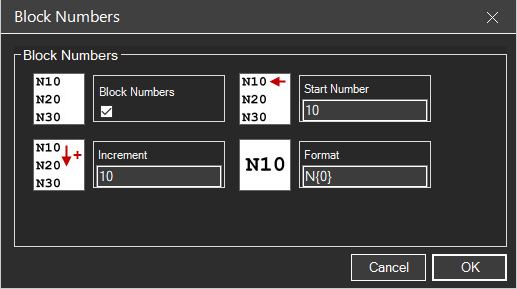
2.7.1 Accessing the Feature
To use automatic block numbering:
- Press CTRL + B
- Or navigate to Edit → Block Numbers in the menu
2.7.2 Basic Functionality
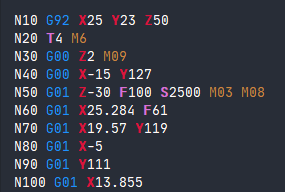
The feature allows users to add (or renumber) block numbers to your program by enabling the Block Numbers option and specifying parameters.
2.7.3 Configuration Options
Users must enter:
| Parameter | Description |
|---|---|
| Start Number | The beginning value for block numbering (e.g., 10) |
| Increment | The step value between consecutive block numbers (e.g., 10) |
After setting these values, click OK to apply the numbering.
2.7.4 Managing Block Numbers
- Adding/Renumbering - Repeat the process if blocks are deleted or added to the program
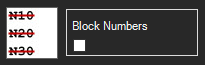
- Removing - Open the Block Numbers dialog, deselect the Block Numbers checkbox, and click OK
2.7.5 Advanced Formatting
The dialog includes a format option for customizing number appearance. While the default format typically suffices, users can enter "formatting codes" to adjust the display style.

Example: With Start Number = 10 and Increment = 10, blocks will be numbered N10, N20, N30, N40, etc.
Related Sections: