
2. The CNC Editor
Code Coloring
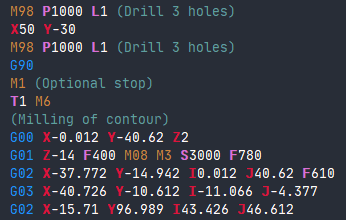
Code coloring is an editor feature that automatically highlights different types of CNC commands with distinct colors.
Color Scheme
The CNC editor uses color coding to distinguish various program elements:
| Element | Color | Example |
|---|---|---|
| G-codes | Blue | G00, G01, G02 |
| M-codes | Brown/Yellow | M03, M05, M30 |
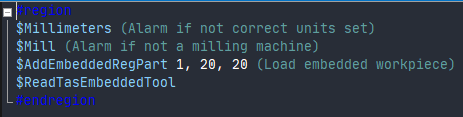
| Special $-commands | Light Blue | $AddTool, $AddPart |
| Comments and strings | Green | (Comment) |
Performance Considerations
Note: Very large programs, such as those used for 3D Printing, will not be colored as it would slow down the editor.
Automatic coloring helps to:
- Quickly identify different command types
- Spot syntax errors
- Improve program readability
- Distinguish between code and comments
Related Sections
- 2.3 Programming Help Pop-ups - Learn about contextual help while coding
- 2.8 Comments in Code - How to add comments (shown in green)