
2. The CNC Editor
Editor Overview
The CNC Editor is the primary interface for writing and modifying CNC code in CNC Simulator Pro.
Key Features
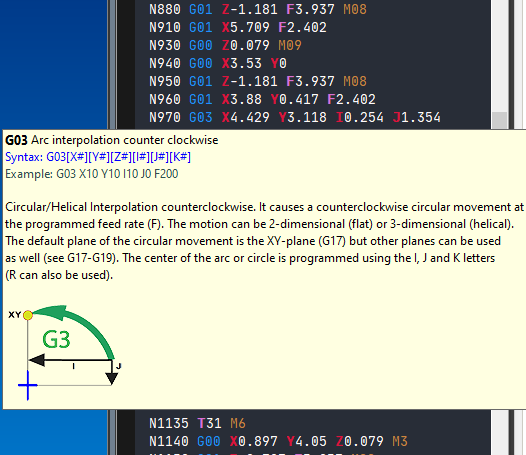
The CNC editor includes built-in functions to assist you while coding. Recognized CNC codes will be colored, and pop-up lists will help you with useful information while writing.
Editor Features
- Code coloring - Automatic syntax highlighting for G-codes, M-codes, and special commands
- Programming help pop-ups - Contextual suggestions while typing
- Code regions - Organize code into collapsible sections
- Pause points - Set breakpoints for simulation debugging
- Find and replace - Quickly search and modify code
- Automatic block numbering - Automatically number code lines
- Comments in code - Add notes and documentation
- CNC headers - Create standardized program headers
- Undo and redo - Complete edit history management
- Convert - Convert between metric and imperial units
- Runtime mode - View status during simulation
Tip: The editor automatically recognizes valid CNC codes and highlights them with different colors to facilitate reading and writing your program.