
2. The CNC Editor
Runtime Mode
Runtime mode is the editor state during simulation execution, with specific visual indicators.
2.12.1 What It Is
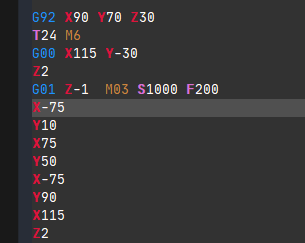
Runtime mode is activated when you start a simulation in the CNC editor. The interface shifts to a read-only state during simulation execution, preventing program modifications.
2.12.2 Visual Indicators
During Simulation
During runtime (simulation is running), the background color of the editor changes slightly to indicate that it is in runtime mode. A gray line marks the current block being processed.
Error State
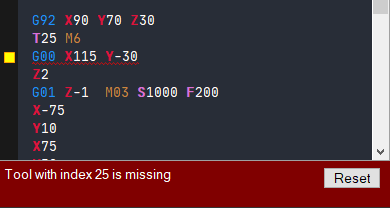
If the interpreter detects an error, you will see an alarm message and the editor will go back to normal mode, allowing edits. The problematic block receives a red wavy line so you can easily find it and correct the error.
Interrupted Execution
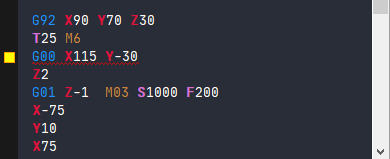
If you stop the execution (simulation) of a CNC program before it is done, a yellow square symbol indicates the last executed block.
2.12.3 State Summary
| State | Indicator | Editing Allowed |
|---|---|---|
| Running | Different background + gray line on current block | No |
| Error | Red wavy line on error block | Yes |
| Interrupted | Yellow square on last block | Yes |
Note: In runtime mode, the editor becomes read-only - you cannot make edits while simulation is active. Only errors force the system back to normal editing mode.
Related Sections:
- ⬅️ 2.11 Convert
- 📚 2.5 Pause Points - For controlling execution