
4. The Inventory Browser
Mill Workpieces
Mill Workpieces define the shape and dimensions of raw material for milling operations.
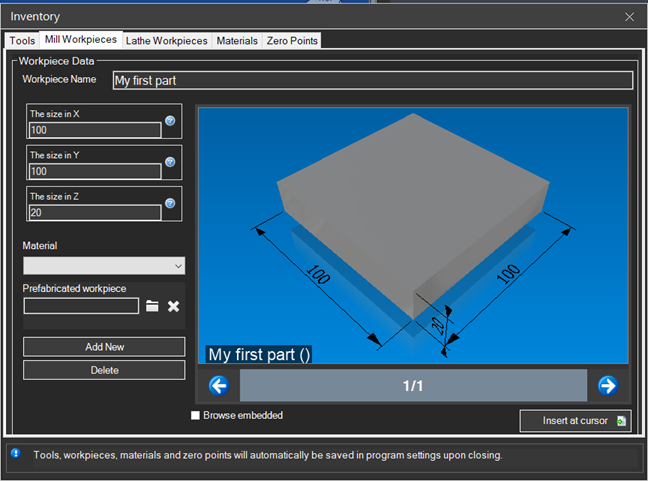
Available Shapes
Rectangular Block
The most common shape for milling. Defined by three dimensions:
- Width (X) - Dimension along the X axis
- Depth (Y) - Dimension along the Y axis
- Height (Z) - Dimension along the Z axis
Cylinder
For round parts to be machined on milling machines:
- Diameter - Outer diameter of the cylinder
- Height - Length of the cylinder
Disc
A cylinder with reduced height, ideal for:
- Flanges and circular plates
- Gears and sprockets
- Covers and lids
Workpiece Setup
- Open the Inventory Browser (F4)
- Expand the "Mill Workpieces" section
- Select the desired shape
- Enter dimensions in the properties panel
- Double-click to load the workpiece

Tip: Always set the raw stock slightly larger than the finished part for machining allowance.
Origin Positioning
The workpiece origin determines the program zero point:
- Top center - Origin at center of top face (most common)
- Corner - Origin at a workpiece corner
- Geometric center - Origin at volume center